A Day in the Life

A day in my life. Thoughts on leadership, management, startups, technology, software, concurrent development, etc... Basically the stuff I think about from 10am to 6pm.

1/25/2007

Experienced Multithread Developer...so good I don't need locks

This has got to be one of the funniest things I've read all year. (Of course it's still early...)

"We have a multi-threaded .NET application, the problem is that the previous programmer didn't care to have locks on the shared variables. Somehow the application doesn't end up in Locked state on a single CPU machine but I have tried running it on several dual core machines and it randomly freezes. I am searching for a quick-fix until I implement locks around all the shared variables in the entire application.

Is there a way to bound the .NET application to single CPU.

Thanks!" link

Anyone who has been reading my postings or attended any of my concurrent development presentations will immediately see the humor in this. However, I will explain for the unenlightened....

I have been saying all along that there are a lot of folks writing multithreaded applications that have no idea what they're doing. The original developer is one of them. Now this guy is probably going to keep writing multithreaded apps because he thinks he has successfully done it before. In fact his new company may have hired him because of that experience. This is funny.

The other funny thing is that I've said time and time again that often a newbie will add multithreading and then only test on a single processor. Some folks have asked me how any one could be so...ignorant. (I want to say stupid but we're trying not to use that word at home.) Well folks, here you have it. Never underestimate a person's ability to do stupid...I mean ignorant things.

Labels:

12/27/2006

The challenge of concurrency

This month’s copy of ACM Queue has got a really amazing interview in it with John Hennessy and David Patterson, authors of the very popular textbook, "Computer Architecture: A Quantitative Approach"


"...From my perspective, parallelism is the biggest challenge since high-level programming languages. It’s the biggest thing in 50 years because industry is betting its future that parallel programming will be useful.

Industry is building parallel hardware, assuming people can
use it. And I think there’s a chance they’ll fail since the software is
not necessarily in place. So this is a gigantic challenge facing the
computer science community. If we miss this opportunity, it’s going to be bad for the industry.

Imagine if processors stop getting faster, which is not impossible. Parallel programming has proven to be a really hard concept. Just because you need a solution doesn’t mean you’re going to find it." - David Patterson
I find this quote extremely interesting because it never occurred to me that the software development community would not rise to the challenge. While I agree that it is a major paradigm shift for many developers, there are pockets of developers who have been building parallel applications for years. I suppose one of the key questions is, can we help our colleagues make the shift?

I agree with Dr. Patterson’s statement that parallel programming is hard. Engineers are required to really know the systems that they are building software on and the tools they are using. As I’ve traveled around giving my presentation on concurrent software development, I’ve found that there are a large number of developers that are not aware of what is really happening in their code. These developers are accustomed to using only the high-level languages they commonly write in and rarely, if ever, dig down into the real bits and bytes that are actually being executed. This lack of low-level knowledge handicaps them when it comes time to track down multi-threading bugs. Remember that threads are a kernel tool and while high-level languages wrap threads to fit their development paradigm, you can’t escape the reality that they are still kernel tools.

"Hey, the world has changed. The La-Z-Boy approach isn’t going to work anymore. You can’t just sit there, waiting for your single processor to get a lot faster and your software to get faster, and then you can add the feature sets. That era is over. If you want things to go faster, you’re going to have to do parallel computing." - David Patterson

There are a lot of folks working on the problem of making concurrent software development easier. By defining technologies and standards: OpenMP, MPI; parallel languages; and new products: Digipede Framework SDK, Intel Threading Analysis Tools, Coverity’s Concurrency Defect Manager.

But at the end of the day the important thing is that people are learning how to think in parallel. Whichever tools they decide to use, right now, isn’t as important as the journey that they are going on. Because if they were paying attention...when they come out the other side they will have a natural and intuitive understanding of how to add concurrency to their applications.

As a developer and an optimist, I'm going to hope that we succeed at this and I'll continue to do my part to help that happen. But we will fail if the engineering community doesn't wake up and realize that times have changed. We have to put a little more thought and effort into adding concurrency to our applications; we have to learn.

Labels:

9/27/2006

Concurrency: "To infinity...and beyond!"

As many of you know Intel’s Developer Forum happened this week in San Francisco. Intel announced that they will have quad-core machines on the market in November and 80-core machines in five years...Slow down there big guy! While quads are something software engineers can understand...80? What operating system are you going to use? Because I can’t think of a one.

John Dvorak has a nice piece on this very subject that you can read here. It’s validating to see my OS concerns echoed by someone with some clout...maybe the hardware guys will listen. Once you’ve gone beyond infinity...who cares? You may get there and realize that’s not where you want to be, because you will find yourself ALL ALONE.

Instead. I suggest that once you’ve maxed out what the available OSs can handle...how about working on getting that power miniaturized? Image the power of quad in a handheld!

John has a great line:

Ah, yes, I'm guessing that only a few people are aware that whether a chip has two cores or four cores or 80 cores only one core can actually be used with most of today's software.

Oh, I’m aware. I’m also aware that many applications that have been designed to take advantage of multiple CPUs... haven’t been thoroughly tested in that environment. Chaos shall reign! The reason for this is that engineers started using threads. Threads are the default concurrency tool because thread support comes with the operating system. But many engineers treat threads as something akin to message queues. Simply as a way to separate the user interface (foreground thread) from the actual algorithms (background thread). So that the user has a responsive experience with the application.

On a single CPU machine these threads have to share the CPU, so only one thread is every really running in memory at a given time. There is no true concurrency happening on a single CPU machine. This all changes as you start adding CPUs. And many applications aren’t going to be ready.

I like John’s idea of the OS dedicating cores to specific applications. The real-time implications of this are staggering. While John is thinking Universal Translator...I’m thinking something that is smart enough to clean my toilet. All I need is some duct tape, a toilet brush, new Lego Mindstorms kit, wireless network, ......

Labels:

8/28/2006

Concurrent Development: Required Personality Traits

I came across this post by Rob Walling. Rob writes about four personality traits that the best software developers have. I’m going to use those traits and explain why any developer who hopes to make the shift to being a concurrent software developer must find someway to draw those traits to the surface of their psyche.

Pessimistic

While I wouldn’t have used the term pessimistic, (I would have used realist), the idea is sound. You must confront the reality of your situation. Period. You are an engineer. It is your job to make sure that the applications work and to anticipate ALL the things that can go wrong. Because if you don’t find it...someone else will. And if that someone is a customer it can be bad for your company and maybe even you.

Anticipating the worst requires mental discipline, a comfortable knowledge of how the system and software work, and the willingness to test your assumptions. All of this can be learned.

If you are using threading as your concurrency tool, it is absolutely vital that you understand context switching and time slices. You have to make sure that threaded code can lose a time slice at any point, still produce the expected results, and not cause other threads to fail. This needs to be tested and not just by the test team but by you. And not just on a single processor box, but on a multiprocessor box. Test is NOT a dirty word. You should be doing it early and often. Because when things go wrong...a good engineer makes sure that they know about it before anyone else.

Remember, you are not in marketing...you are an engineer; anticipate the worst and plan for it.

Angered By Sloppy Code

If the code is sloppy...then how can you understand it? If you are using threads there will come a point in the development process where the only tools you’ll have for isolating a thread problem will be a log file and your knowledge of the code. When you get to this point...sloppy code can kill you. Concurrency developers don’t have the luxury of unclear thinking or convoluted solutions. Clean code AND a clean architecture make it easier to identify shared resources and potential problems.

"Someone who fixes a problem but doesn't take the time to find out what caused it is doomed to never become an expert in their field." – Rob Walling

If you try to fix a thread problem without understanding it...I can guarantee that you didn’t fix the problem...you just moved it. Thread problems often manifest when a time slice is released at just the right time and you’re not protecting something as well as you think you are. If you just fix the symptoms then the problem will manifest again and will be even harder to track down next time. Fix it when it happens and fix it right.

Long Term Life Planners

"Cause and effect, chain of events, All of the chaos makes perfect sense, When you’re spinning round things come undone...Welcome to Earth 3rd rock from the Sun" – Joe Diffie

Yes, I listen to county western music. I love that song because it is such a perfect example of how one thing affects another to the point where things just get nuts. And with threads things can get really nuts if you’re not careful. That is why planning is so important.

Concurrency should be planned into your application from the beginning but if that isn’t an option for you...plan how you’re going to add it. Don’t just sit down and start writing code. Figure out all the Pieces Parts. Hope for the best, but plan for the worst.

Once you’ve figured out where you can add concurrency and how you’re going to add it...you need think about the future. To support concurrent applications you have to add more processes to your software development cycle.

Put processes in place to protect the code. For example, your team may have fifteen people on it of which only two are responsible for the threaded code. Your two threading engineers should code review all changes made by the other engineers that could even remotely affect the threaded code. If you are the engineering manager don’t make the mistake of thinking that everyone "gets" parallel development, because they don’t.

Also put in automated build and test processes designed to catch threading issues as close to the code change as possible. This will make tracking down the problems easier. Don’t forget to add logging and log levels to your applications and to TRAIN your test team.

Attention to Detail

Well...I think the need for this trait is summed up in the first three traits. The idea of paying attention to details is tied up in mental discipline, planning, and testing. Don't be lazy...just do it!

Conclusion

Concurrent software engineers have to juggle a harder programming model than sequential software engineers. So make it as easy on yourself as you can. Writing code for parallel execution requires that developers learn to think differently, it’s not just me waving my hands here.

"It's not intrinsically harder to write threads, but developers need to get used to thinking that way and we need help from the tools," Reinders said. "In the serial world, it doesn't matter which order you do things or how you break them down." - article link...

Labels:

8/25/2006

Concurrent Development: Pieces and parts...

I hope that you took my last post seriously. While kind of kooky the approach actually works and for those of you who are old enough to remember the shift to object oriented development; we need all the help we can get. Let’s say that you’ve taught yourself how to look at the world with the eyes an experienced multitasker. Now it’s time to start thinking about how to apply this new way of thinking to your code.

There are three main areas in concurrent program design: decomposition, communication, and synchronization.

Decomposition - the task of identifying both functions and data within an application that have parallelizable elements as well as identifying shared resources.

Communication - how the parallelizable elements communicate with each other and/or the rest of the application.

Synchronization - how to manage the creation, execution, and termination of the parallelizable elements such that shared resources are not corrupted or locked out and the expected results are achieved every time.

Start and end with decomposition because you will need to continuously exam your application for opportunities and potential problems. Any engineer using concurrency must approach software development as a big picture activity. Generally this has been the responsibility of the architects and leads, but now it’s yours as well. If you’re going to use concurrency in your applications you MUST understand how your application is put together. You must be able to identify:

1. Parallelizable areas that perform the same function over and over, but act on different data. You will often find these algorithms in loops.

2. Parallelizable areas that are not algorithmically connected and can execute at the same time. The obvious example of this is a UI thread and a background worker thread.

3. Critical areas of code that must never be executed in parallel. These codes sections are often found around shared resources that must be accessed sequentially.

4. Large bulk processes that can be easily split up and processed in parallel. An example of this is the breaking up of a large EDI (Electronic Data Interchange) file for ETL (extract, transform, and load).

Know your code. Know your tools. Know your business.

Labels:

8/24/2006

Concurrent Development: I think therefore I am; I am therefore I think

Learning to develop using the concurrent model requires a mental shift in how a developer problem solves. This mental shift can be difficult and to help demonstrate this: try patting your head and rubbing your stomach at the same time. Too easy... how about: hold your screaming infant while simultaneously checking the temperature of the formula without dropping the kid or the bottle. Learning to multitask in your day to day life will help you learn to multitask in your software because you learn to identify WHEN it’s safe to multitask. It’s probably not a great idea to try and check the formula while holding a screaming baby at 3am in the morning (assuming that you’re half awake). But we’ve done it haven’t we.

Change is a process. Most engineers can teach themselves to multitask and the action of multitasking exposes people to the idea of doing more than one thing at a time. If the pathways in your brain are not wired for thinking in parallel, then you have to start building those pathways. You have to train yourself.

This reminds me of my step-father who used to constantly tell us kids, "If you’re going into the kitchen, take a dirty plate with you." Thanks Gary, that was early training for concurrent software development techniques.

What you need to learn to do is:

1. Identify multitasking opportunities.
2. Learn to judge how "safe" it is to do those tasks in parallel.
3. Learn to distinguish between similar parallel activities, conjunction parallel activities, and always needs to be sequential activities.

While there are some folks who already have all these skills, many folks don’t. So take a little time and learn it. Train your mind by using your body.

More later...

Labels:

8/23/2006

Concurrent Development: Spotting the Wave

Over the years I’ve had the pleasure of working on several multithreaded applications but rarely have I been involved with the projects from the beginning. Usually I’ve been brought in because the teams couldn’t stabilize the systems. While this is a great ego boost and a chance to play the white knight – it’s a pain. I’ve had a lot of time to think about grid computing since I started at Digipede and very early I recognized the relationship between threads and grid objects. Both are tools that support concurrent software development and both have their place in solutions requiring high performance and scalability.

For those of you who haven’t been keeping up with the latest hardware trends. CPU clock speed has reached a major roadblock. The general computer buying public (this would be us) is not going to see new processors with faster chips until the hardware vendors figure out how to either reduce the generated heat or a how to more efficiently draw the heat away. To continue to bring us the new and faster computer chips that we’ve become accustomed to, the hardware vendors are adding processors to the core. Dual-core machines are already on the market and they are not restricted to servers. Those chips are going into desktops and laptops as well. And it has been predicted that the hardware vendors are not going to stop at two. I would take that bet.

In the past our applications would automatically reap the benefit of faster CPUs but that is not going to be the case with the multi-core machines. We, the software developers of the world, are now going to have to work to make our applications faster. This means that software developers are going to have to learn how to build software applications that take advantage of concurrency.

There are many differences between sequential and concurrent software development. Sequential software development boils down to the idea that there is only ever ONE part of your application running at any time. Even when it looks like there is more going on...say when you send a message, catch an event, run something asynchronously (without threads), etc... There is only one part of the application running and there can BE only one part running.

With concurrent software development, one or more parts of your application can be executed at the exact same time. I say can, because concurrent software applications that are run on a single processor machine are sort of a hybrid sequential/concurrent application. While parts of the application are capable of running at the same time (in parallel), there is only one processor and the single processor acts as a bottleneck. The operating system assumes responsibility for switching (time-slicing) between all the different threads and processes running on the computer. Barring the concurrent application on the single processor case; concurrent applications are designed to take advantage of multiple processors and of the operating system’s time-slicing capability resulting in the improvement of an application’s performance and scalability.

This is the beginning of a series of posts on concurrent software development; it is a journey that much of the software development community is going to have to take. I hope that the information that I share here will be make the transition from sequential to concurrent development easier.

Labels:

7/03/2006

Interview mentioning Microsofts’ enty into HPC

I ran across an interview today that I thought was interesting and I wanted to share it with you. A Conversation with Myricom’s Chuck Seitz, the question that caught my eye was, “HPCWire: How will Microsofts’ entry into HPC affect the cluster computing market? More specifically, how will it affect Myricom?” Here is the part of his response that interested me, I’ve bolded and added reference numbers so that I can comment on what I thought was interesting:

"My views about the likely success of Windows CCS clusters for HPC are influenced by the experience that about 85 percent of Myricom's market (in dollars) is customers who have no interest in being software developers or system administrators, even though they are probably running Linux today. These are customers such as auto companies running LS-Dyna or Fluent, or Saudi Aramco running seismic and reservoir-modeling codes, or the chemistry department at the University of Anywhere. These customers don't operate giant clusters, but perhaps up to a few hundred nodes. This is the market that Microsoft has said that they are going after, clusters of limited size where the most important factor for customer satisfaction is that the installation and maintenance be turnkey. [1]

In the Linux world, licensed applications are distributed as binaries linked to specific libraries, such as specific MPI libraries. Each time Linux and the libraries change, the application vendors have to generate and test new binaries. [2] One very smart thing that Microsoft has done to reduce the logistical problems in operating a cluster and to make life easier for application developers is to standardize the APIs. For fast networks, the APIs for message passing employ Sockets (Winsock Direct). This approach gives up a very small amount in performance, but allows applications to be distributed as binaries, exactly fitting the Microsoft Windows world."

[1] It’s nice to see the words of our CEO echoed by another CEO.

[2] I didn’t know this. I wonder how often Linux administrators update stuff and how the application vendors manage versioning. Anyone know how much of a problem this really is?

Interesting interview, go check it out.

Labels:

6/20/2006

The Future of Grid Computing: A look into my crystal ball

Grid computing is here to stay and I believe we are preparing for a tipping point. The tipping point HAS NOT happened yet, but its coming. When it happens there will be an explosion of new applications and the rewriting of old ones. I believe this because we (computer users) have been demanding, getting, and using increased processor speed and more responsive operating system architectures. The acceptance of grid computing will result in a new programming paradigm with developers creating grid-based products and using Grid Oriented Architecture (GOA) to develop them.

Part 1
Grid Oriented Architecture starts with the high-level look at the product in question. Architects identify what parts of the application can run in parallel and what parts can’t. They then look at the parallel work and decided which work is best run in a thread and which work is best run on a grid. Work that can run on a thread is work that has limited scaling requirements (remember that for optimal use of threads, there should be one processor per thread), and a very short execution time. The other parallel work with be executed on the grid.

Historically grid solutions have distributed executables and scripts but with the new style of grid computing, grid solutions are able to distribute actual instantiated objects, i.e. the power of grid computing INSIDE your application. .NET and XML serialization make this possible on networked Windows machines and Digipede is the first company to provide this capability. Object distribution on a grid is a key enabler for grid computing acceptance among the development community because this technology allows the developer to approach grid problems in a manner similar to how they already approach threading problems, uses familiar object oriented techniques, and reduces the complexity of initializing the work and retrieving results.

Because Digipede is the only grid solution that distributes objects, I’m going to discuss Digipede object distribution. Here are some of the advantages to distributed objects:

- Distributed objects are created by simply instantiating an object from a class—developers can use familiar object oriented methodologies.

- Object initialization happens in the main code body. When initializing distributed executables a developer is limited to the type of data that can be easily sent on the command-line, in an input file, or via a database. For the average development problem this creates unnecessary complexity. With distributed objects the developer sets the initialization properties in the object and the data elements can be any data type. From a programming perspective this is also nice because it provides encapsulation. Input files and databases can still be used, but being able to use OOP methodologies allows the developers to finish their work faster because they are able to use methodologies they already know.

- Object results are returned to the main code body inside the distributed object. With distributed executables a developer can return an integer on the command-line, a result file, or update a database. With distributed objects the developer sets the results properties of the object on the compute node and the results are serialized back to the main application. Again the data elements can be of any type.

- The distributed objects are returned to the main application when execution on the compute node finishes. The main application is notified of the returned object via an event. This serializes the parallelized work, which eliminates much of the complexity associated with threading.

Distributing objects on the compute grid makes it very easy to add grid computing to any application. It is this ease of use which will propel grid computing to general acceptance.

Digipede has provided other functionality geared toward making it easy on everyone and that is that the Digipede Network will automatically move dependent files. The Digipede Network can automatically figure out what some of the files are and there are APIs available for the rest. Many cluster and grid solutions require that the user preinstall the executables on the compute nodes. (With the Digipede Network you will only have to preinstall software that requires an installation program.) This allows newly added compute nodes to quickly and seamlessly contribute to the grid. Eventually all grid computing solutions will provide this functionality simply because it makes it easier for the user, the developer, and the IT folks.

The order of the day is ease of use. That will gain grid computing full acceptance as a viable development tool. Don’t make people invest precious time figuring out your grid infrastructure; instead give them the power of the grid in a manner they are already familiar with.

Part 2
More companies will grid-enable their applications using standard grid platforms. We’ve already seen one partner do this, 4th Story. 4th Story’s application has a checkbox that enables the user to add the power of grid computing to the computations that 4th Story is running. Customers have been excited about having this functionality available within the 4th Story product and they have also been excited about the fact that they can use that same grid for their own applications. That grid is the Digipede Network and we will see more companies deciding that they need a grid solution and it really makes sense financially to use someone else’s.

Part 3
With the move toward mobile computing solutions, the ubiquitousness of the Internet, SOA, and the power of grid computing, we are also going to see more powerful mobile applications. With a thin client or even just a browser, running on the mobile device and the core applications running on SOA on a grid, developers will unlock the opportunities inherent in powerful mobile devices. Where in the past there was the client/server software approach we will see the same thing start to happen on hardware, with the device acting as the client and the SOA/grid acting as the server. A fun area for this will be mobile gaming but I also think there will be applications in the areas of chemical sensors and monitoring, CAD and construction, medical, and security.

Conclusion
Grid computing is on the rise and with the ease of use of the Digipede Network it’s only a matter of time until other grid providers drink the Kool-Aid and start making their solutions more accessible. With the Digipede Network Windows application builders will have a leg up.

Technorati tags: , ,

Labels:

5/17/2006

Grid Computing: Another great reference...

In my previous post about this week’s eBig presentation on HPC I mentioned an article you should read to be better prepared. I just stumbled across a very good presentation that I think you should also take a look at before Thursday. At Only4Gurus I found a presentation by Dr. Shirish Chinchalkar from Cornell Theory Center titled "HPC and Grid Computing". This presentation gives a very good overview of HPC, grid computing, and web services, and provides a video that shows HPC in action behind a spreadsheet.

Labels:

4/26/2006

Grid Computing: More on DNS Security

I blogged last week about why I think that building business applications on the Internet is dangerous. Those thoughts were directly related to the call for more SOA solutions as well as the global grid computing push. Today there was a conversation on Slashdot that supports my concerns. Two Cornell documents were highlighted:

  • "A Survey of DNS Security: Most Vulnerable and Valuable Assets"

  • "Perils of Transitive Trust in the Domain Name System" by Venugopalan Ramasubramanian and Emin Gun Sirer

  • As I’ve been studying grid computing the idea of security kept coming up and until recently I didn’t "get it." I had assume that the security lay directly with the transport protocols but the security problems are much deeper and will likely be much harder to fix.

    If you want to see how many servers are involved with resolving a site name you can use the link below. Copy the link into your web browser and replace my web address with yours.

    http://beehive.cs.cornell.edu:9000/dependences?q=krgreenlee.blogspot.com

    My results:

    CoDoNS DNS Survey
    ________________________________________
    DEP krgreenlee.blogspot.com <- A.GTLD-SERVERS.NET because of com
    DEP krgreenlee.blogspot.com <- G.GTLD-SERVERS.NET because of com
    DEP krgreenlee.blogspot.com <- H.GTLD-SERVERS.NET because of com
    DEP krgreenlee.blogspot.com <- C.GTLD-SERVERS.NET because of com
    DEP krgreenlee.blogspot.com <- I.GTLD-SERVERS.NET because of com
    DEP krgreenlee.blogspot.com <- B.GTLD-SERVERS.NET because of com
    DEP krgreenlee.blogspot.com <- D.GTLD-SERVERS.NET because of com
    DEP krgreenlee.blogspot.com <- L.GTLD-SERVERS.NET because of com
    DEP krgreenlee.blogspot.com <- F.GTLD-SERVERS.NET because of com
    DEP krgreenlee.blogspot.com <- J.GTLD-SERVERS.NET because of com
    DEP krgreenlee.blogspot.com <- K.GTLD-SERVERS.NET because of com
    DEP krgreenlee.blogspot.com <- E.GTLD-SERVERS.NET because of com
    DEP krgreenlee.blogspot.com <- M.GTLD-SERVERS.NET because of com
    DEP A.GTLD-SERVERS.NET <- a2.nstld.com because of GTLD-SERVERS.NET
    DEP A.GTLD-SERVERS.NET <- c2.nstld.com because of GTLD-SERVERS.NET
    DEP A.GTLD-SERVERS.NET <- d2.nstld.com because of GTLD-SERVERS.NET
    DEP A.GTLD-SERVERS.NET <- e2.nstld.com because of GTLD-SERVERS.NET
    DEP A.GTLD-SERVERS.NET <- f2.nstld.com because of GTLD-SERVERS.NET
    DEP A.GTLD-SERVERS.NET <- g2.nstld.com because of GTLD-SERVERS.NET
    DEP A.GTLD-SERVERS.NET <- h2.nstld.com because of GTLD-SERVERS.NET
    DEP A.GTLD-SERVERS.NET <- l2.nstld.com because of GTLD-SERVERS.NET
    DEP a2.nstld.com <- b2.nstld.com because of nstld.com
    DEP krgreenlee.blogspot.com <- ns1.google.com because of blogspot.com
    DEP krgreenlee.blogspot.com <- ns2.google.com because of blogspot.com
    DEP krgreenlee.blogspot.com <- ns3.google.com because of blogspot.com
    DEP krgreenlee.blogspot.com <- ns4.google.com because of blogspot.com

    It took 26 nameservers for you to find me....

    Technorati tags: , , ,

    Labels:

    4/19/2006

    Grid Computing: Global SOA and Global Grid

    I’ve been doing a lot of thinking lately about SOA. Primarily because I think that some SOA services should be built on a grid infrastructure. I’ve read articles and posts that indicate that I’m not the only person who thinks this. But the architect in me has to answer the questions, “Why?”, “What is the compelling business reason for SOA on grid?”, “Where in the architecture stack does grid belong?” And those thoughts have led me to question the reliability of global SOA and global grid solutions. At least for the short-term.

    As I’ve thought about this area I can’t get away from the impression that the idea of global grid and publicly available services is dangerous. One thing I’ve learned over the last 19 years building software applications is that the software I build is directly affected by the platform I build it on. I’m not just talking about operating systems; I’m also talking about the firmware underneath.

    In 1994, Intel shipped a Pentium chip that had a floating point error in it. If you had been a software developer building an application on one of those boxes you might have wasted some time looking through your code trying to figure out what you did wrong. Or worse you may have been trying to figure out how your customer got some unexpected result. The hardware is the bottom of the pile and has APIs that the OS calls into. Your application is probably using 3rd party libraries and makes calls to the OS. As a developer you inherently trust that all the stuff below you on the stack has been tested and works correctly. It usually does.

    The idea of global grid and global SOA requires that the application stack be solid. And I don’t think it is. I watched Dr. Tom Leighton’s presentation
    "The Challenges of Delivering Content and Applications on the Internet"
    last night and quite frankly it scared the crap out of me. I’m very concerned that the Internet is not ready to be a reliable application infrastructure. One comment that Dr. Leighton made really hit home for me (this is how I remember it), “The Internet was built on a platform of trust.” Security was not the first thing on people’s minds. But security is vital for any Internet based application. It’s one thing to read a webpage for information; it’s another to interact with a web application that passes around privileged and proprietary information. Dr. Leighton’s description of how the backbone companies work and how easy it is for phishers to grab a DNS address is frightening.

    One of the problems with the Internet that Dr. Leighton described is how network companies’ play with the BGP Best Path algorithm’s input so that they can save money. So you might want to send an email from Oakland, CA to Boston, MA and instead of it going straight across the country, it might pass though some routers in Israel. Huh? This is going to slow down your applications which isn’t as much a problem for SOA as it is for grid. One of the major reasons to use grid computing methodologies is to improve performance.

    But what is even a larger concern I think is that phishers can redirect a DNS address to themselves. Basically giving them a technique for capturing all the data one business may be sending to another. The businesses may never even know that a leak occurred and there is no way for them to do anything to prevent it. The attack point is outside of their firewalls.

    Now there is A LOT of data that flows over the Internet everyday that gets there safely. I know that. But it only takes one bad apple to spoil the barrel, so to speak. And the doors are wide open. What’s going to happen if the next war we fight isn’t a ground-based shoot people type of war, but a cyber war? The more applications that are added to the Internet infrastructure, the more reliant our economy is on that infrastructure, and the more susceptible to outside attack we are.

    I don’t think the sky is falling. But I think that if we want to build Internet applications for businesses we need to take a closer look at how solid the Internet platform is. For the time being, I am a proponent of building SOA on grid inside your firewalls. Figure out the details and requirements there...within your protected sandbox. Meanwhile, look for products and services that can help you build safe, reliable, and secure Internet applications.

    Reading list for grid and SOA:
    "IBM’s Take on Grid, Virtualization and SOA"
    "Distributed Parallel Computing with Web Services”
    "The 451 Group: Financial Sector Grid Adoption Growing Beyond Mere Compute"

    Or just do a search on: “grid computing” SOA - Google produces over 5 million pages hits.

    Internet Infrastructure Links:

    "The Challenges of Delivering Content and Applications on the Internet"

    "Experimental Study of Internet Stability and Wide-Area Backbone Failures"
    "What’s the next security threat?"
    "Effects of Worms on Internet Routing Stability"
    "Phishers Hack Bank Sites, Redirect Customers"
    ICANN

    Technorati tags: , , , ,

    Labels:

    3/23/2006

    Grid Computing: On the Move

    Grid computing is not a panacea. In technology there is no such thing. What grid computing is is a new way to approach software problems. Can’t kick your transactions through your current systems fast enough. Break-up the transactions into transaction blocks and process them in parallel. Do you have computations that take forever? Parallelize them. Not all applications need the power of a super computer, but some do. And those solutions need that power bad.

    It’s very exciting that Sun Grid is up and running and available to the public. Like any new paradigm shift, grid computing needs its early adopters. The early adopters increase the knowledge-base, prove and test the technology, and teach those who follow. The Sun Grid has got the technology community talking. Even though the talk today has primarily been about the DoS attack (Slashdot: Sun Grid DoS’d) this is still great for grid computing. With Sun Grid opening its service up to the public, people are going to play with it. Also good for grid computing. Way to go Sun and a big “Thank You” from this grid proponent.

    Labels:

    3/10/2006

    Digipede: Distributing Excel Computations

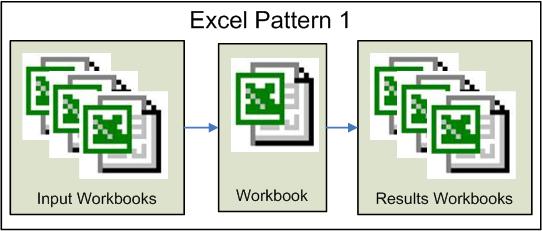
    I put together a series of posts that show you how to grid-enable an Excel workbook using the Digipede Network. I selected an Excel pattern that is fairly common and easy to convert.


    With this Excel pattern there is a computation that is run against n number of input files. Because the same computation is run against each input file, the computation is parallelizable and easy to grid-enable. Following the steps defined in each part, I show you how to grid-enable this Excel pattern.

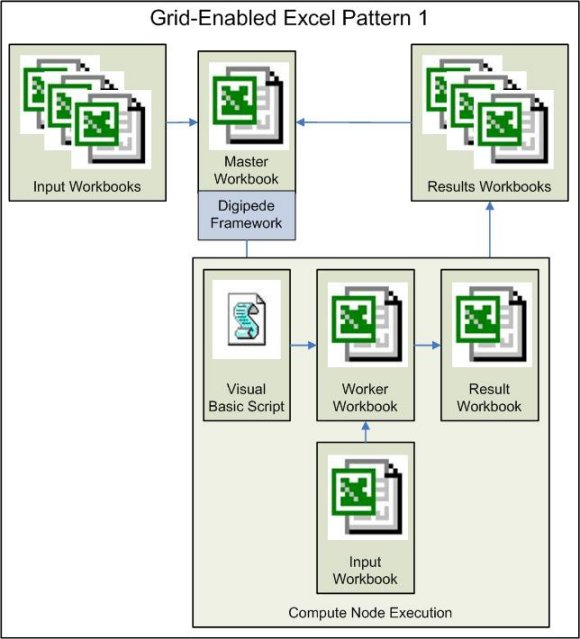
    Part 1 - Shows how to set up a Digipede Job in the Master workbook to distribute a Worker workbook and a launch script. Part 1 also defines a template launch script.
    Part 2 - Shows how to add a Task level input file to the Job. One input file is distributed with each Task.
    Part 3 - Shows you how to start the Worker workbooks computation via a VBA macro.
    Part 4 - Shows you how to change the Job defined in the Master workbook to return a results workbook.
    Part 5 - Shows you how to use a JobCompleted event to know that the Job is finished and you can do something with all the results files.
    Excel Automation Considerations - You didn’t think Excel automation was easy did you? In this section I tell you what the problems are and how to work around them.

    Once the workbook has been grid-enabled my model looks like this: (Remember that the Worker workbook will be running simultaneously on multiple compute nodes.)


    Let’s consider some numbers
    So let’s say you have 100 input files and that the computation takes 10 seconds to process one file. Running the unconverted workbook will take approximately 1000 seconds or 16.67 minutes.

    With a grid-enabled Master and Worker workbook setup, multiple machines will process input files simultaneously, so your compute time can be reduced by increasing the number of machines working on the problem. Since the Team Edition comes with 5 agents (enabling five compute nodes), let’s say there are five machines working. Each machine will work on 20 files, at 10 seconds per computation. So with five compute nodes you can run through your input data set of 100 files in 200 seconds or 3.33 minutes. There is a little time overhead to move the input and results files, but that time is negligible when taken in with the over all time savings.

    Now an important point about those five nodes. The machines do not have to be a dedicated cluster, they do not have to be dedicated to this job. You can run jobs on desktop computers that people are currently using. The jobs run in the background and the user won’t even realize it. You can grid-enable multiple applications and several can be running on your grid at the same time.

    That's all folks
    There are other Excel patterns that are well suited for grid computing. The Digipede SDK supports both .NET and COM APIs, so what can be done in VBA with COM can also be done in .NET. Imagine what you could build.

    Labels:

    Digipede: Distributing Excel Computations - Excel Automation Considerations

    Excel assumes a GUI so automation (which is GUI-less) can be a little tricky. I'm going to take you through a few areas of consideration in the automation process.

    Microsoft has a document available called "Considerations for server-side Automation of Office" which explains in detail how Microsoft does not recommend running automated Excel objects on remote machines. Please take the time to read the Microsoft document because it's important for you to understand the technological limitations of Excel. Within the Microsoft document is a section called Problems using Automation of Office server-side, I will address each of the issues and how you can work around them on the Digipede Network. I've also encountered other automation problems and I've broken all the issues up into three main groups: Administration Issues, Worker Workbook Issues, and Debugging Tips and Tricks.

    Administration Issues

    User Identity
    Excel is designed to run in an interactive manner. So Excel makes assumptions as to what directories and security configurations exist when it is launched. Running Excel as an automated COM server does not guarantee that the needed settings are there. You will have to configure each compute node to satisfy Excel's needs. We have identified two areas:
    1. Excel requires a valid user identity because it needs the associated profile. When a domain user logs into a machine the operating system automatically creates directories and settings that Excel uses. To solve this problem on the Digipede Network, install each Digipede Agent with a valid user identity. During the Digipede Agent installation on the 'Logon Information' page select 'Specific User' and enter a valid user login for the machine. Make sure that the user identity has logged into the compute node at some time so that the default profile information exists.

    2. To launch an automated Excel instance from the Digipede Agent you will need to make sure that the specified user identity has the correct COM security settings. Follow these steps:

      1. Open the 'Component Services' from within the 'Administrative Tools' or from the command-line by typing dcomcnfg.exe.

      2. Expand the 'Component Services' branch so that you can see 'My Computer'.

      3. Right-click on 'My Computer' and select 'Properties'.

      4. On the 'My Computer Properties' dialog, select the 'COM Security' page.

      5. In the 'Launch and Activation Permissions' group box, select the 'Edit Default' button.

      6. If your user id is not listed in the 'Group or user names' list control, select 'Add' and add it.

      7. With your user id selected in 'Group or user names', select the checkbox 'Local Launch' and 'Local Activation'.

      8. Select 'OK', select 'OK', and then close 'Component Services'.


    Resiliency and Stability
    During installation Microsoft Office products have the option of performing "install on first use" for some components. If an uninstalled component is needed by an Office instance an installation wizard for the missing component is started. This causes a problem for any automated server-side Office instances because now there is a UI that can't be dealt with programmatically. Developers will need to work with their IT departments to control this problem.

    If a Digipede job seems to hang, I recommend running the Worker workbook on the compute node to make sure that this problem doesn't exist. If it does exist get the required components installed on the compute node. You will see similar behavior if you're Worker workbook requires an add-in. Make sure that everything the Worker workbook needs is installed on the compute node.

    If your Excel distribution pattern creates an Excel object, it is recommended that all the compute nodes in your target pool run the same version of Excel.

    Server-Side Security
    There are several levels to security. The Digipede Network will not accept a work request that has not properly logged in. This ensures that only users who have been given access to the Digipede Network can request work on it.

    Code level security is the responsibility of the developers. Each developer must ensure that their code is secure and doesn't create problems on the compute node or network.

    You will need to configure Excel so that the Macro security level is low, to avoid the security dialog.

    Worker Workbook Issues

    NOTHING that is written to run on the compute nodes can have a GUI. Not Excel, not the run script, not your code. Dialogs will lock the compute node up while the software waits for a user to hit a button.

    Interactivity with the Desktop
    Excel was designed around the user interface so you have to programmatically disable all UI functionality. The Microsoft article "How To Dismiss a Dialog Box Displayed by an Office Application with Visual Basic" discusses various messages that may come up and how to disable them. (If you are distributing a Worker DLL, it is also important for the developer to remember to not put message boxes into the code contained in DoWork().)

    Sample Visual Basic 6 code to disable Excel GUI:
        Dim myExcelApp As Excel.Application

    myExcelApp.DisplayAlerts = False
    myExcelApp.AskToUpdateLinks = False
    myExcelApp.AlertBeforeOverwriting = False
    myExcelApp.FeatureInstall = msoFeatureInstallNone

    Disabling display of message boxes will avoid any user interaction problems. To be courteous to the user of the desktop where the Excel work is being done, it is recommended that you first save the current settings, disable everything, and then reset the values on exit.
    Update: the above statement has been found to be wrong because each instance of Excel running as a COM server is running in it's own process space and as a result Application method calls do NOT affect other instances. The problems with Application method calls affecting other workbooks can happen when opening multiple workbooks in the same Excel instance.

    Reentrancy and Scalability
    Excel is an application that can be slow to close down and if you haven't released all the objects it doesn't close down at all. It's not enough to make a call to Application.Quit() you must also make sure to release all Excel objects. And if you are using managed code (ie. .NET) then you will also need to perform garbage collection...twice.

    Sample C# ShutDown() method:
    private void ShutDownExcel() {

    if (mExcelApp != null) {

    mExcelApp.DisplayAlerts = true;
    mExcelApp.Quit();

    System.Runtime.InteropServices.Marshal.ReleaseComObject(mExcelApp);
    mExcelApp = null;
    }

    // Clean up memory so Excel can shut down.
    GC.Collect();
    GC.WaitForPendingFinalizers();

    // The GC needs to be called twice in order to get the
    // Finalizers called - the first time in, it simply makes
    // a list of what is to be finalized, the second time in,
    // it actually the finalizing. Only then will the
    // object do its automatic ReleaseComObject.
    GC.Collect();
    GC.WaitForPendingFinalizers();
    }

    If you are not cleaning up the Excel objects by releasing them and performing garbage collection, multiple instances of Excel will be left open. This is visible by using Task Manager and sorting by Image Name. Excel does not support an unlimited number of active Excel instances so the compute node will eventually be unable to respond to Excel requests. As the developer you MUST confirm that your Worker workbook closes properly and that Excel is exiting cleanly. More information can be found in the Microsoft MSDN article "Office application does not quite after automation from Visual Studio .NET client".

    One other factor to consider is that it is possible to have an active user running Excel. You must be careful not to affect the user's work.

  • Do not make any Application level Calculate() calls as this may cause calculations to start on the active user’s workbook.

  • Do not shut down the user's instance of Excel, so be very careful about calling Application.Quit().


  • Update: the above statement has been found to be wrong.

    Strange Excel Lessons
    Make sure to use fully qualified paths when referencing anything in Excel. Excel apparently doesn't use the current directory as the working directory so you need to set the Application.DefaultPath to control where files are saved. You will also need to open any files and run any macros by using a fully qualified path, otherwise Excel can't find them. It is safest to use fully qualified paths whenever referencing any Excel objects.

    Always control the Worker workbook through a script or an assembly. Trying to launch Excel directly makes it VERY hard to shutdown when it's finished. It's just easier to debug and to control using a launch mechanism. Make sure that the script engine is non-gui. (So use cscript instead of wscript.)

    Debugging Tips And Tricks

    Make sure that Excel is closing down properly on the compute node by looking at the Task Manager process list. When Excel is run automated it launches as not visible by default. This means you need to look on the Processes page to determine if you are orphaning an Excel process. You can quickly find the Excel process by sorting on the Image Name. You should kill all orphaned Excel processes.

    I used a few different techniques in the VBS script to determine what was going on:

    1. Create a log file and write to it to determine what is happening in the automated session.
      Dim fso, f1
      Dim logFileName
      logFileName = "mylog.txt"
      Set fso = CreateObject("Scripting.FileSystemObject")
      Set f1 = fso.OpenTextFile(logFileName , 8, True)
      f1.WriteLine("MyScript: Start")
      f1.Close

    2. If you create a results file you make want to save it before you exit the script, this lets you see exactly what is being generated by the Worker workbook before the Digipede Network moves it.
      ' Make a copy of the results file
      Set objFSO = CreateObject("Scripting.FileSystemObject")
      Dim strResultsFile
      strResultsFile = strPath & "\Results" & TaskId & ".xls"
      strSourceFile = strPath & "\Results.xls"
      objFSO.CopyFile strSourceFile , strResultsFile

    3. Write your code to catch errors, don't let them get passed out. You can then update the log file with the error code.
      Dim strMacroName
      strMacroName = "'" & strPath & "\Worker" & "!Sheet1.StartCmdBtn_Click"
      on error resume next
      myExcelWorker.Run strMacroName
      if err.number <> 0 Then
      ' Error occurred - just close it down.
      End If
      err.clear
      on error goto 0

    I also created a log file for the Worker workbook aid in debugging.

    Public Sub LogMessage(ByVal strMessage As String)

    '------------------------------------------------
    ' open existing file for appending,
    ' if the file does not exist a new one is created
    '-------------------------------------------------
    Dim strFilePath As String
    strFilePath = Application.DefaultFilePath & "\mylog.txt"

    Dim fileNumber As Integer
    fileNumber = FreeFile()

    Open strFilePath For Append As #fileNumber ' Create file name.
    Write #fileNumber, strMessage ' Output text.
    Close #fileNumber ' Close file.
    End Sub

    Conclusion

    Make sure that the run script and Worker workbook actually run on a compute node before trying an all out distribution test. Run it once. Debug it until it runs, then expand. Remember Henry David Thoreau's important contribution to the software industry, "Simplify, simplify, simplify."

    Essay Links:

    Start
    Automation
    Part 1
    Part 2
    Part 3
    Part 4
    Part 5

    Labels:

    3/03/2006

    Grid Computing: Ahhh, But We Do Still Need Servers

    Nicholas Carr wrote a post that argues that with the introduction of grid and utility computing, the server market will decline. In the post Mr. Carr states,

    In this scenario, the core unit of business computing would not be small, inflexible servers but rather large, flexible computing clusters or grids. These clusters in turn would be built not from traditional branded servers but from cheap, commodity subcomponents - chips, boards, drives, power supplies, and so on - that the grid operators would assemble into tightly networked physical or virtual machines. Many of the functions and features built into today's branded servers would be taken over by the software running the cluster.
    Dan Ciruli responds by pointing out,

    Computes just aren't the same. Computes look different on different operating systems. Not all software runs on all operating systems. Different people prefer different toolsets, and they always will. Some OSs are better for some things than others, and people choose the appropriate OSs for them. Yes, we've all read about "write once, run everywhere" software--but a small minority of software actually runs that way. OSs are different, and they will continue to be different. People will continue to write software that takes advantage of particular OSs.
    But I don’t think Dan went far enough. I agree with Dan and I wanted to add a few points as to why.

    Do you remember these famous quotes?

  • ”I think there is a world market for maybe five computers.” – Thomas Watson, IBM, 1943

  • ”There is no reason for anyone would want a computer in their home.” – Ken Olson, Digital Equipment Corp, 1977

  • “640k ought to be enough for anybody.” - Bill Gates, Microsoft, 1981


  • Our human nature forces us to push new technology. To see what new things we can build with it and do with it. (We are curious creatures.) Grid computing allows a company to get more work out of its servers and desktops. If you think of grid computing using current technology paradigms, I agree that it looks like there will be a decline in the server market. But history has proven that when people are given more computing power they find new things to do. What we are really going to see with the increased acceptance of grid computing is an increased need for computing power. Just image the new technologies and applications we will invent with the increased availability of affordable super computing power. Look at what Google can do with their “super computer.” And don’t think for a minute that companies don’t want the opportunities currently available to Google. When we, as the technology sector, accept the grid paradigm shift we will see a surge in the server market, not a decline.

    In addition there will continue to be a need for multiprocessor boxes because some computations are better suited to a threading model than a grid model. Grid and threading technologies are complimentary. The Digipede grid computing model offers a methodology for simplifying some threading cases, but if your application uses micro-threads in a thread pool you will still want a multiprocessor box. And as Dan pointed out there are other aspects to the grid solution; like where your data lives and what OSs and applications your team is already trained in.

    Technology acceptance is organic and I don’t think Geoffrey A. Moore was that far off when he wrote about the “Technology Adoption Life Cycle.” We build on what we know and on what makes us feel safe. That’s how we’re built. There may be a time when servers will become completely commoditized but it won’t be grid computing that makes that happen because the process has already started and grid computing isn’t widely accepted. The only question concerning servers is which company will be able to make that shift from high-end servers to commoditized servers.

    Server commoditization coupled with grid computing makes the next 10 years in tech look as exciting as the PC revolution. It’s a good time to be an engineer.

    Labels:

    3/01/2006

    Digipede: Distributing Excel Computations – Part 5

    Well, we’re in the home stretch now. We have our results but how do we know when the Tasks and Job are complete? The Digipede Network will tell you. In Part 1 I didn’t show you how mJob was declared. It’s declared as a global like this:

    Dim WithEvents mJob As Digipede_Framework.job
    .
    .
    Dim mFileResultsLoc As String
    Dim mResultsCount As Integer

    Using WithEvents tells the VBA interpreter to expect the object to receive
    events. Digipede will send events to the Master workbook for the mJob object.

    Update to Excel Master with VBA code-behind:
    (Add this code)

    ' Handle the completion of a job
    Private Sub mJob_JobFinished(ByVal sender As Variant,
    ByVal e As Digipede_Framework.JobStatusEventArgs)

    Sheet1.Range("FinishedTime") = Format(Time, "hh:mm:ss")

    Dim errMsg As Variant
    If e.Error Is Nothing Then
    If e.JobStatus = Digipede_Framework.JobStatus_Completed Then
    ' Do Work Here – Create a report file
    Dim oResultsBook As Workbook
    Dim strFilePath As String

    Dim iIndex As Long
    For iIndex = 1 To mResultsCount
    strFilePath = mFileResultsLoc & "\results" &
    Application.WorksheetFunction.Text(iIndex, "00") & ".xls"
    Set oResultsBook = Application.Workbooks.Open(strFilePath)

    'Do analysis and create report

    'Clean up
    oResultsBook.Close
    Set oResultsBook = Nothing
    Next i1

    Sheet1.Range("Messages") = "Success"
    Else
    errMsg = "Job completed with status: " & e.JobStatus
    Sheet1.Range("Messages") = errMsg
    End If
    Else
    errMsg = "JobCompleted Error: " & e.Error.Message
    Sheet1.Range("Messages") = errMsg
    End If
    End Sub

    ' Handle the successful completion of a task
    Private Sub mJob_TaskFinished(ByVal sender As Variant,
    ByVal e As Digipede_Framework.TaskStatusEventArgs)

    Dim errMsg As Variant
    If e.Error Is Nothing Then

    If e.TaskStatusSummary.FailureMessage = "" Then
    mResultsCount = mResultsCount + 1
    Else
    errMsg = "Task " & e.TaskId & " exited with error: " &
    e.TaskStatusSummary.FailureMessage
    Sheet1.Range("Messages") = errMsg
    End If
    Else
    errMsg = "Task " & e.TaskId & " exited with error: " & e.Error.Message
    Sheet1.Range("Messages") = errMsg
    End If
    End Sub


    You, the programmer, can process each Results workbook in mJob_TaskCompleted()
    as it is finished and/or you can process the workbooks at the end of the Job in mJob_JobFinished().

    I have just Digipede-enabled a workbook that uses a data workbook to initialize calculations. The calculations produce results workbooks for each calculation instance. The Master workbook then processes the results workbooks into a report workbook.

    So yes, you can distribute and run Excel on a grid. There is no silver bullet; you will have to do a little work. But it’s only a little work and the reduced execution time will likely more than make up for it. There are two things left to do to complete this exercise: 1) Write up all the debugging tricks I used and tell you about the strange Excel quirks I discovered. 2) Create a consolidation post with some pictures to show you what happened and links to all the parts.

    Essay Links:

    Start
    Automation
    Part 1
    Part 2
    Part 3
    Part 4
    Part 5

    Labels:

    2/27/2006

    Digipede: Distributing Excel Computations – Part 4

    Now that I’ve run my calculations I’m ready to return the results to the Master workbook. As I said at the end of Part 3 I’m going to save my results in to a results workbook and send that workbook back to the Master workbook. This means defining another FileDef in my Master workbook and since I want my results in a different directory than my input files, I create a new RemoteLocation as well.

    Updates to Excel Master with VBA code-behind: (New code bolded)
    . . .
    ' Create a RemoteLocation for the Worker Script
    Dim location As Digipede_Framework.RemoteLocation
    Set location = New Digipede_Framework.RemoteLocation

    location.ID = 0
    location.location = fileStartLoc
    location.ProtocolType = Digipede_Framework.ProtocolType_Share
    jobTemplate.RemoteLocations.AddItem location

    ' Create a RemoteLocation for the Results files
    Set location = New Digipede_Framework.RemoteLocation
    location.ID = 1
    location.location = fileResultsLoc
    location.ProtocolType = Digipede_Framework.ProtocolType_Share
    jobTemplate.RemoteLocations.AddItem location

    .
    .
    .
    ' Create a filedef for the Data workbook
    Dim dataWBFileDef As Integer
    Dim strInputDataFile As String
    strInputDataFile = "InputDataFile"

    Set fileDef = New Digipede_Framework.fileDef
    fileDef.ID = 2
    dataWBFileDef = fileDef.ID
    fileDef.RemoteLocationId = 0
    fileDef.Name = strInputDataFile
    fileDef.Relevance = Digipede_Framework.Relevance_InputPlaceholder
    jobTemplate.FileDefs.AddItem fileDef

    ' Create a filedef for the Results workbook
    Dim resultsWBFileDef As Integer
    Dim strResultsDataFile As String
    strResultsDataFile = "ResultsDataFile"

    Set fileDef = New Digipede_Framework.fileDef
    fileDef.ID = 3
    resultsWBFileDef = fileDef.ID
    fileDef.RemoteLocationId = 1
    fileDef.Name = strResultsDataFile
    fileDef.Relevance = Digipede_Framework.Relevance.Relevance_ResultPlaceholder
    jobTemplate.FileDefs.AddItem fileDef

    .
    .
    .
    Dim strResultFile As String

    ' Create a job
    For i = 1 To 5
    Set oTask = New Digipede_Framework.Task

    ' Set up the data file transfer
    strDataFile = "Data" + Application.WorksheetFunction.Text(i, "00") + ".xls"

    Set fileDef = New Digipede_Framework.fileDef
    fileDef.ID = dataWBFileDef
    fileDef.RemoteLocationId = 0
    fileDef.LocalName = "Data.xls"
    fileDef.RemoteName = strDataFile
    fileDef.Name = strInputDataFile
    fileDef.Relevance = Digipede_Framework.Relevance_Input
    oTask.FileDefs.AddItem fileDef

    ' Set up the Results file transfer
    strResultFile = "Result" + Application.WorksheetFunction.Text(i, "00") + ".xls"

    Set fileDef = New Digipede_Framework.fileDef
    fileDef.ID = resultsWBFileDef
    fileDef.RemoteLocationId = 1
    fileDef.LocalName = "Result.xls"
    fileDef.RemoteName = strResultFile
    fileDef.Name = strResultsDataFile
    fileDef.Relevance = Digipede_Framework.Relevance_Result
    oTask.FileDefs.AddItem fileDef


    Dim taskParameter As Digipede_Framework.parameter
    Set taskParameter = New Digipede_Framework.parameter
    taskParameter.Name = parameter.Name
    taskParameter.Value = i
    oTask.Parameters.AddItem taskParameter

    mJob.Tasks.AddItem oTask
    Next i


    The changes to the Master are all that is required to move the Results file. But
    there are some important issues that need to be addressed in how the Worker saves the Results.xls file.

    By default Excel will save a file in the last specified save directory. This means that you must save the Results file using a fully qualified path. Since we set the Application.DefaultFilePath in the RunWorker script we use that to save the Result file in the location the Digipede Network is expecting to find it.


    ResultFileName = Application.DefaultFilePath & "\Result.xls"
    .
    .
    .
    oResultBook.SaveAs Filename:= ResultFileName
    oResultBook.Close False
    Set oResultBook = Nothing


    The last thing we need to do is to make sure that the Results directory specified in the Master variable fileResultsLoc allows the Digipede Network to write to it. If your Results directory is not a top level directory make sure that you change the permissions for the top level directory.

    In Windows Explorer right-click on the Results directory, select ‘Properties’, then the ‘Sharing’ property page. On the ‘Sharing’ page select the ‘Permission’ button, and on the ‘Permissions for Results’ property page check ‘Full Control’. Select the ‘OK’ button and then the ‘OK’ button again.

    We have one last piece to do to finish the development part of this project and that is to pull all the Result files together. In Part 5, I will show you how the Digipede Network notifies the Master application when a Job is complete and how the user can use that notification to process the results.

    Essay Links:

    Start
    Automation
    Part 1
    Part 2
    Part 3
    Part 4
    Part 5

    Labels:

    Digipede: Distributing Excel Computations – Part 3

    In Parts 1 and 2 I showed you how to move the Worker workbook, the RunWorker script, and the Data workbook to the compute nodes. In Part 3 I’m going to show you how to start the computation in the Worker workbook from the RunWorker script.

    I’m going to let the Worker workbook open the Data workbook itself. The RunWorker script could open the Data workbook and populate Worker but this is an Excel sample, so I’m going to let Excel do all the heavy lifting.

    RunWorker must make an Excel VBA call to cause the Worker to begin work. You have two choices: Calculate () or Run (). I recommend staying away from Application.Calculate () because if the Worker is running on a work station that already has other Excel workbooks open, the Application.Calculate () will initiate calculations on those other workbooks. We don’t want that to happen. It breaks one of the first rules of software development which is: Play well with others. If we’re lucky there will be a Workbook.Calculate () in Excel 12, but it’s not available now and our safest bet is to stick to either Application.Run () or Worksheet.Calculate().

    Generally if your Worker workbook calculations were being initiated by a subroutine then you would call Application.Run () from the RunWorker script. If you were initiating calculations by pressing F9 on Excel then you will need to identify the worksheet hierarchy and call Calculate() on the top most worksheet, the calculation will then ripple through the workbook.

    I’m going to use Run () in this example because all of the parallelizable Excel workbooks I’ve seen so far have had code-behind.

    The reason that Part 3 has take so long to get out has been do to the trouble I’ve had figuring out the format the macro name needs to take for the Run () to execute. I thought I had understood it but I find that I understand it much better now! The macro name sent to Run () is made up of three parts: the filename, the Excel Object name, and finally the macro name.

    To get the names of the macros available in an Excel workbook:
      1. Open the workbook in Excel

      2. From the Menu Bar select ‘Tools’ then select ‘Macro’ and finally select ‘Visual Basic Editor’ – these steps open Microsoft Visual Basic with the code-behind for this workbook.

      3. Within Visual Basic from the Menu Bar select “Tools” then ‘Macro’. You now see the list of macros available within the workbook for external reference. If the macro you want to call is not listed there, you must redeclare the macro as Public. The format of the macro in the list box is the second and third parts of the macro name that Run () needs. The first part of the macro name is the fully qualified path and name of the workbook (without the .xls extension). It is a safe practice to put single quotes around the fully qualified filename incase there are spaces somewhere in the name.
    Update RunWorker Launch Script:

    .
    .
    .
    WBook.Sheets(“Automate”).Range(“O3”) = TaskId

    Dim strMacroName
    strMacroName = "'" & strPath & "\Worker'" & "!Sheet1.btnStartCalc_Click"
    myExcelWorker.Run strMacroName
    .
    .
    .


    Once the calculation is complete you have the option of storing the results in a
    database or a results file. I’m going to store my results in a result workbook and send that back to the Master since that demostates Digipede specific functionality. I’ll show you how to do that in Part 4.

    Essay Links:

    Start
    Automation
    Part 1
    Part 2
    Part 3
    Part 4
    Part 5

    Labels:

    2/22/2006

    Digipede: Distributing Excel Computations – Part 2

    Yesterday I created a JobTemplate that moved template level files to the compute nodes. (The Worker workbook and the RunWorker script) Today I’m going to solve the problem of telling the Worker what to do. The value of a Worker is that it allows you to parallelize the execution of your spreadsheet. In the Digipede Network a Job is made up of Tasks and each Task sets up a parallelized version of your computation.

    Usually each computation requires different “seed” data. With Excel we can use several different techniques to get the seed data from the Master to the Worker.

    In Part I you saw code in the RunWorker script that put a value into a cell on a worksheet in the Worker workbook. I created a Digipede Parameter in the Master workbook to send in a seed value to the RunWorker script. I then wrote the value to the Worker workbook so that I could see that the RunWorker script executed. I can create as many Parameters as I want, but beyond a certain number things will get unwieldy. If you want to use Parameters with Excel you have no choice but to use some other application or script to launch the Worker workbook because Excel does not pass command-line parameters to the workbook.*

    When you have large amounts of data to send to the Worker, you can use a seed file, such as another Excel workbook, or you can extract the data from a database. Since I already showed you how to send a Parameter to a Task, I’m now going to show you how to send a seed file. Accessing a database doesn’t require anything Digipede specific. You won’t be moving any files and the key(s) that you’ll need for your search can be sent in as a Parameter(s).

    Updates to Excel Master with VBA code-behind: (New code bolded)

    ' Create a filedef for the Worker Excel file
    Set fileDef = New Digipede_Framework.fileDef
    fileDef.ID = 1
    fileDef.remoteLocationId = 0
    fileDef.LocalName = "Worker.xls"
    fileDef.Name = "Worker.xls"
    fileDef.Relevance = Digipede_Framework.Relevance_JobTemplate
    jobTemplate.FileDefs.AddItem fileDef

    ' Create a filedef for the Data workbook
    Dim dataWBFileDef As Integer
    Dim strInputDataFile As String
    strInputDataFile = "InputDataFile"

    Set fileDef = New Digipede_Framework.fileDef
    fileDef.ID = 2
    dataWBFileDef = fileDef.ID
    fileDef.RemoteLocationId = 0
    fileDef.Name = strInputDataFile
    fileDef.Relevance = Digipede_Framework.Relevance_InputPlaceholder
    jobTemplate.FileDefs.AddItem fileDef

    .
    .
    .
    Dim strDataFile As String

    ' Create a job
    For i = 1 To 1
    Set oTask = New Digipede_Framework.Task

    strDataFile = "Data" + Application.WorksheetFunction.Text(i, "00") + ".xls"

    Set fileDef = New Digipede_Framework.fileDef
    fileDef.ID = dataWBFileDef
    fileDef.RemoteLocationId = 0
    fileDef.LocalName = "Data.xls"
    fileDef.RemoteName = strDataFile
    fileDef.Name = strInputDataFile
    fileDef.Relevance = Digipede_Framework.Relevance_Input
    oTask.FileDefs.AddItem fileDef


    Dim taskParameter As Digipede_Framework.parameter
    Set taskParameter = New Digipede_Framework.parameter
    taskParameter.Name = parameter.Name
    taskParameter.Value = i
    oTask.Parameters.AddItem taskParameter

    mJob.Tasks.AddItem oTask
    Next i


    To move a Task level file you must create two FileDefs for it. The first FileDef
    belongs to the JobTemplate and lets the JobTemplate know that there will be Task level files to move. The second FileDef belongs to the Task and identifies the file to move.

    ' JobTemplate level FileDef
    Set fileDef = New Digipede_Framework.fileDef
    fileDef.ID = 2
    dataWBFileDef = fileDef.ID
    fileDef.RemoteLocationId = 0
    fileDef.Name = strInputDataFile
    fileDef.Relevance = Digipede_Framework.Relevance_InputPlaceholder
    jobTemplate.FileDefs.AddItem fileDef


    Notice that the new JobTemplate FileDef has a Relevance of InputPlaceholder.
    Whenever you create a JobTemplate FileDef with the Relevance of InputPlaceholder, the Task definition must contain an associated FileDef object.

    ' Task level FileDef
    Set fileDef = New Digipede_Framework.fileDef
    fileDef.ID = dataWBFileDef
    fileDef.RemoteLocationId = 0
    fileDef.LocalName = "Data.xls"
    fileDef.RemoteName = strDataFile
    fileDef.Name = strInputDataFile
    fileDef.Relevance = Digipede_Framework.Relevance_Input
    oTask.FileDefs.AddItem fileDef


    I did a little trick in the creation of the Task’s FileDef in that I changed the
    name of the data file. I told the Digipede Network that I wanted to move a file named “Data##.xls”, but when my file gets to the compute node I want it renamed to “Data.xls”. This makes it much easier for my Worker workbook because I don’t have to tell the Worker the name of the input data file.

    Because template level files are expected to be the same for all the Tasks, you have the option to leave those files on the compute node so that you don’t have to move them again. This comes in handy when debugging and is one element of a technique I will discuss later that can save your network bandwidth. The behavior is a little different for Task level files. Task level files are expected to be different for each Task. Therefore they are deleted when a Task completes.

    I have also added code to validate the JobTemplate before I submit it to the Digipede Network. This is a good code snippet to have. Because VBA doesn’t allow exceptions using Validate() is your best technique for identifying malformed JobTemplate problems.

    ' Validate the job before submitting to get validation information.
    Dim valItems As Digipede_Framework.ValidationItemCollection
    Dim valSeverity As Digipede_Framework.ValidationSeverity

    valSeverity = jobTemplate.Validate(mJob, valItems)
    If valSeverity = ValidationSeverity_Error Then
    errMsg = "Validation Error Count: " & valItems.Count
    For i = 1 To (valItems.Count)
    errMsg = errMsg & "\r\n " & valItems.Item(i).Message
    Next i
    MsgBox errMsg
    Exit Sub
    End If

    If valSeverity = ValidationSeverity_Warning Then
    errMsg = "Validation Warning Count: " & valItems.Count
    For i = 1 To (valItems.Count)
    errMsg = errMsg & "\r\n " & valItems.Item(i).Message
    Next i
    MsgBox errMsg
    Exit Sub
    End If

    Sheet1.Range("SubmissionTime") = Format(Time, "hh:mm:ss")

    ThisWorkbook.mClient.SubmitJob poolId, jobTemplate, mJob,
    Digipede_Framework.SubmissionOptions_None


    At this point the input data file is being copied to the compute node where either
    Worker or RunWorker can use it. Part 3 will explore a few techniques for initiating the computation in the Worker.

    * As of Excel 2003

    Essay Links:

    Start
    Automation
    Part 1
    Part 2
    Part 3
    Part 4
    Part 5


    Labels: